The best keyboards for work balance a comfortable typing feel with the layout, noise level, and device connections your workday needs. These picks range from quiet wireless office models to customizable compact boards, so choose by the keys and controls you use most.
Quick Top Products
JLab JBuds Wireless Keyboard

- 95 soft-touch keys with a full numerical pad.
- Switch among up to three devices over Bluetooth or USB dongle.
- Rechargeable battery rated for up to 30 days of wireless use.
Best For: People who want a quiet, rechargeable keyboard with a number pad and quick device switching.

JLab Epic Wireless Keyboard

- Full-size layout with 108 backlit keys.
- Soft-touch keys and a metal base.
- Bluetooth pairs with up to three devices, with USB dongle support.
Best For: People who want a full-size wireless keyboard with lighting, a media knob, and multi-device support.
SteelSeries Apex 5
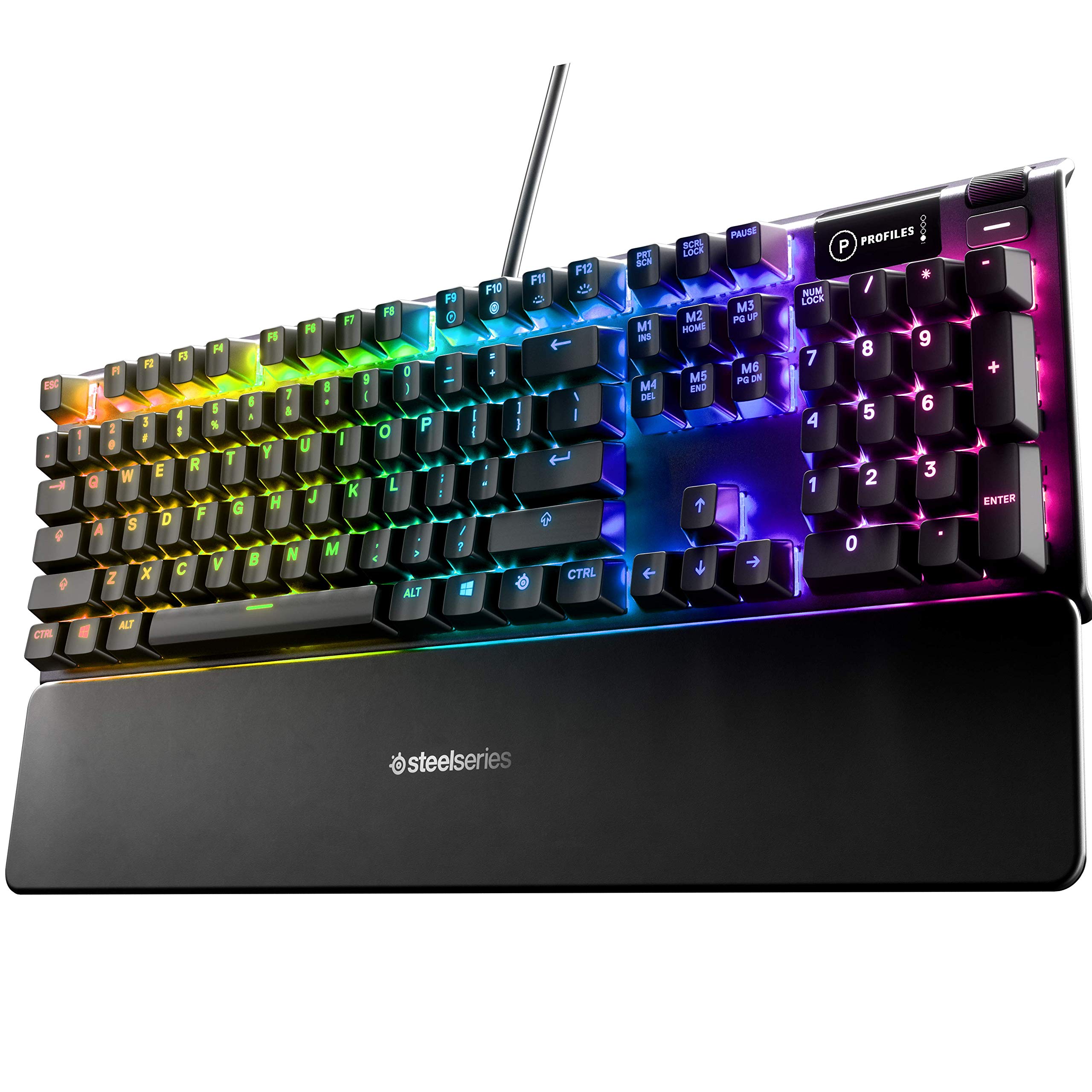
- Hybrid blue switches offer tactile clicks.
- OLED display and magnetic wrist rest are included.
- Per-key RGB illumination.
Best For: People who prefer tactile, audible keystrokes and want a screen and wrist rest at their desk.
SteelSeries Apex 3

- Whisper-quiet switches and a magnetic wrist rest.
- Dedicated multimedia controls adjust volume and settings.
- IP32 water resistance and 10-zone RGB lighting.
Best For: People who want quiet key presses, dedicated media controls, and a wrist rest for a stationary setup.
SteelSeries Apex 3 TKL

- Tenkeyless layout leaves more room to position the keyboard.
- Whisper-quiet switches with anti-ghosting technology.
- Clickable volume roller and media keys.
Best For: People who want a quieter tenkeyless layout with a volume roller and separate media keys.
SteelSeries Apex 7 TKL
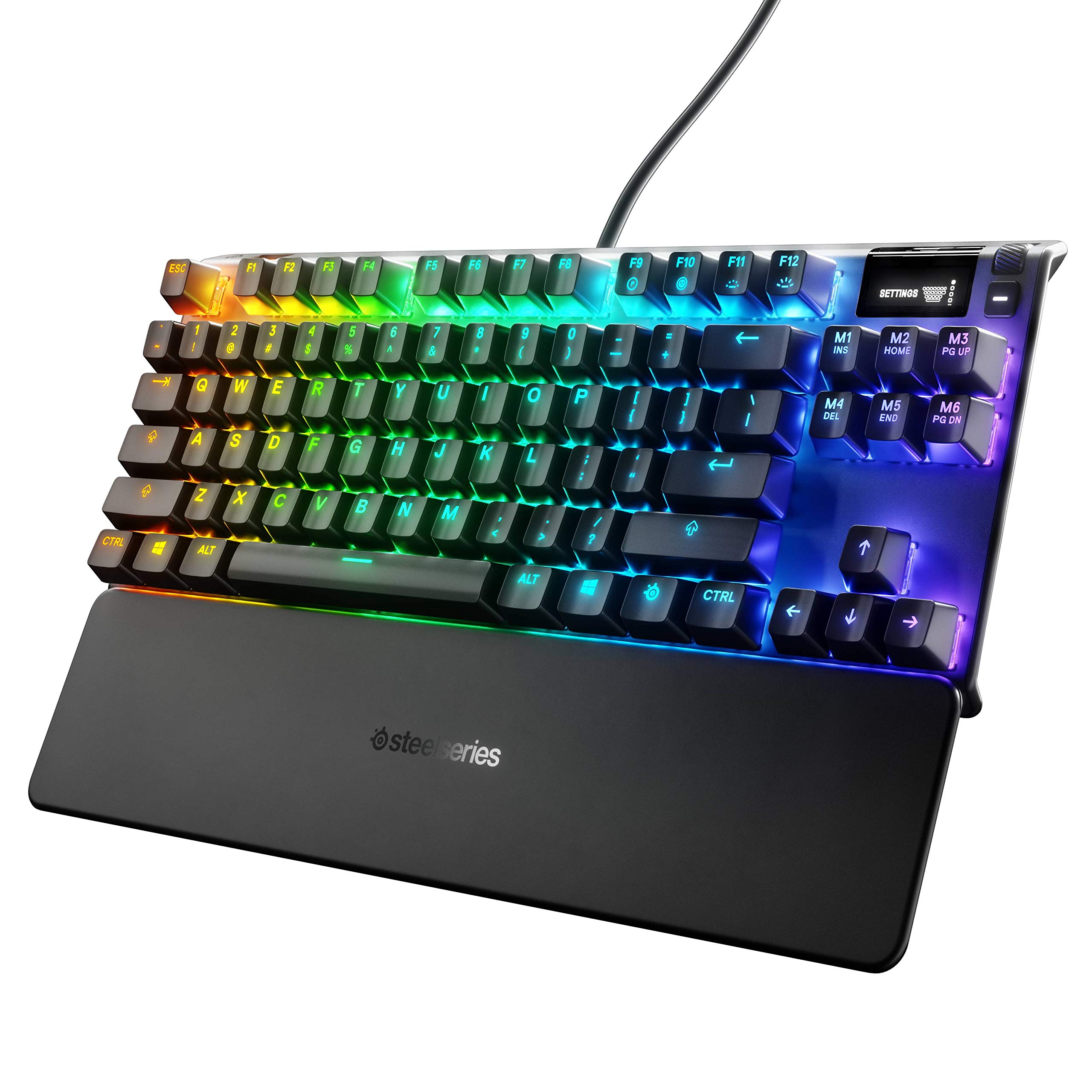
- TKL compact mechanical keyboard with an OLED smart display.
- USB passthrough and media controls are included.
- Linear, quiet red switches and a magnetic wrist rest.
Best For: People who want a compact mechanical keyboard with a display, media controls, and a wrist rest.
SteelSeries Apex 7
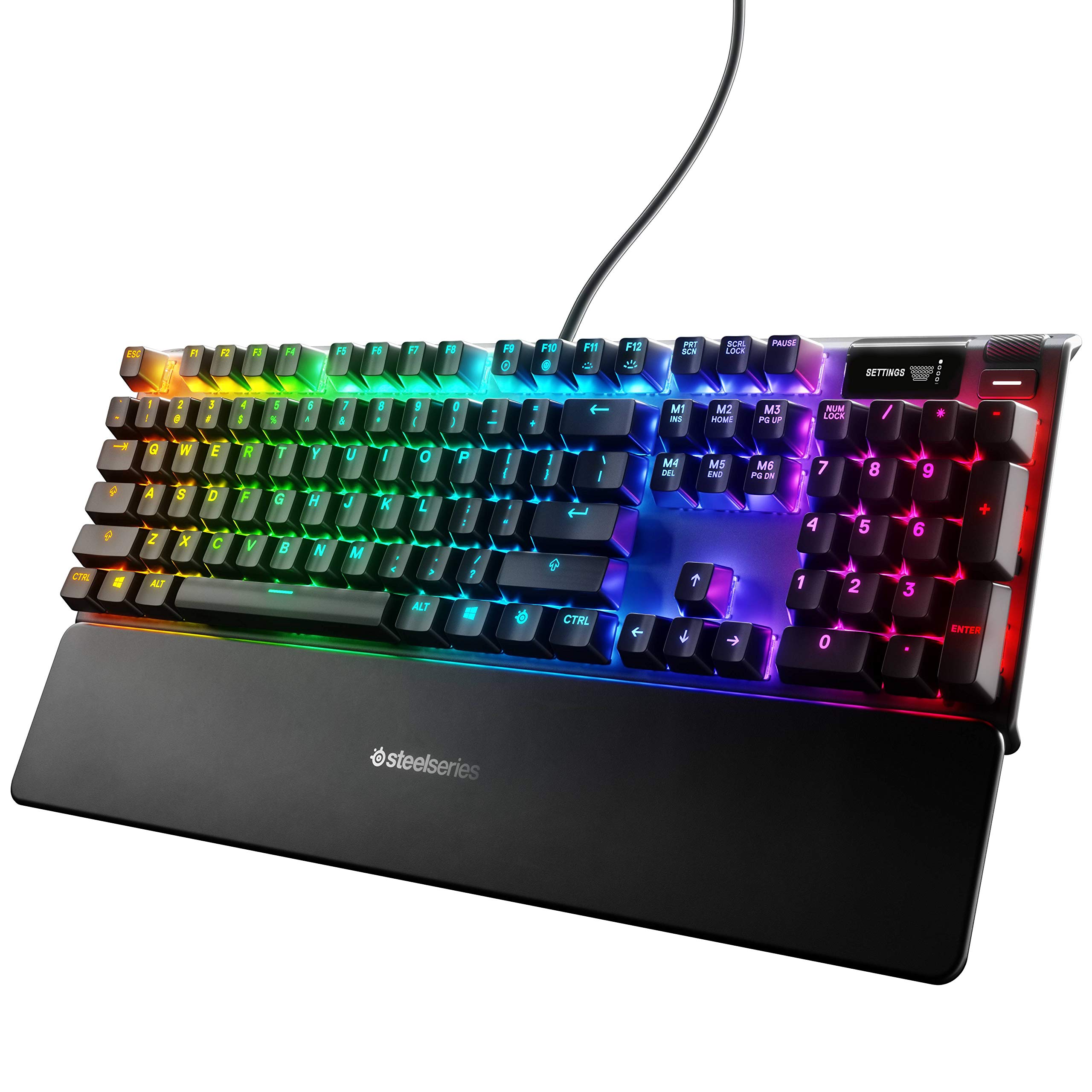
- Blue switches provide tactile, clicky typing.
- OLED smart display, USB passthrough, and media controls.
- Magnetic wrist rest offers palm support.
Best For: People who want a tactile, clicky mechanical keyboard with an OLED display and palm support.
JLab JBuds Wireless Keyboard 16-Pack
- The offer contains a 16-pack of wireless keyboards.
- Each keyboard has 95 soft-touch keys and a media knob.
- Bluetooth and USB dongle support up to three connections.
Best For: Teams or shared offices that need multiple quiet wireless keyboards with number pads.
JLab Go Wireless Keyboard 4-Pack
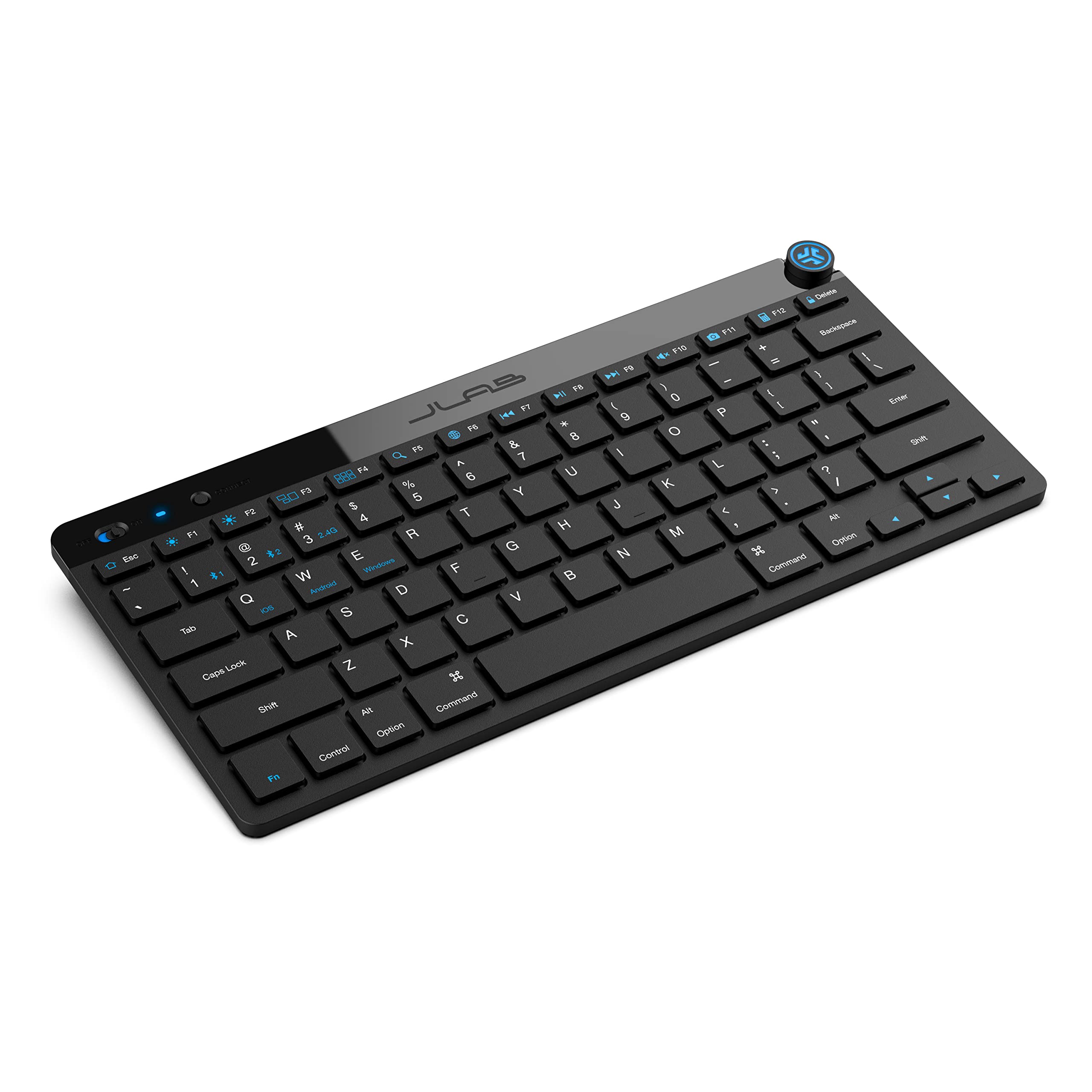
- Offer includes a four-pack of compact keyboards.
- Low-profile keys are designed for quiet, comfortable typing.
- Bluetooth or USB dongle connection with up to three saved devices.
Best For: Teams or classrooms wanting several compact, low-profile keyboards for mixed devices.
SOLAKAKA KI99 Pro Silent Switch

- 96% layout with a knob for volume, media, and lighting.
- Silent switches pair with five noise-reducing layers.
- Hot-swappable keys support 3- or 5-pin switches.
Best For: People who want a customizable mechanical keyboard with quieter switches and a compact number-pad layout.
Wireless Control for a Compact Desk
JLab JBuds Wireless Keyboard, 95 Key, Multi-Device Bluetooth and USB dongle, Soft Touch Keys, Media knob, Custom Profiles, Black
The JLab JBuds pairs a compact 95-key layout with a full numerical pad, so it keeps number entry available while using less desk space than a traditional full-size board. Its soft-touch keys are designed for quiet typing, and a smart media knob controls volume and playback without interrupting a task.
Bluetooth 5.2 and a USB wireless dongle support up to three connections, making it useful for switching between a work computer and other devices. The rechargeable battery is rated for up to 30 days of wireless use.
Check whether the compact key spacing suits your typing habits.
Best For: People who want a quiet, rechargeable keyboard with a number pad and quick device switching.
| Pros | Cons |
|---|---|
|
|
Choose this model if you want wireless flexibility without giving up a number pad, and value a softer, quieter typing style. Its compact layout and dedicated media knob make it practical for shared or busy desks.
The records do not identify backlighting, so check that detail if you often work in dim rooms. Confirm your preferred device can use Bluetooth or the included USB dongle.
Backlit Full-Size Wireless Typing
JLab, Epic, Wireless Keyboard, Bluetooth 5.2, USB Dongle, Multi-Device, Backlit, 108 Keys, Black
The JLab Epic is a full-size wireless keyboard with 108 backlit keys, a metal base, and soft-touch keys intended for comfortable, quiet typing. Its built-in media knob provides direct volume control, while Bluetooth 5.2 supports pairing with up to three devices.
A USB wireless dongle offers another connection option. The keyboard works with Windows, Mac, iOS, Android, and Chrome OS, giving it broad device flexibility for a mixed setup.
Its rechargeable 2000 mAh battery is designed for extended work sessions. Check how the backlight behaves and whether the keyboard offers the specific lighting controls you prefer.
Best For: People who want a full-size wireless keyboard with lighting, a media knob, and multi-device support.
| Pros | Cons |
|---|---|
|
|
Pick the Epic if you prefer a familiar full-size layout and want visible keys for low-light work. The metal base and soft-touch keys suit a stationary desk, while the multi-device wireless options help when work spans devices.
Battery capacity is given, but runtime is not, so consider how often you can recharge before choosing it for long stretches away from power. Check that the desired operating system features are supported.
Clicky Typing with an OLED Display
SteelSeries USB Apex 5 Hybrid Mechanical Gaming Keyboard – Per-Key RGB Illumination – Aircraft Grade Aluminum Alloy Frame – OLED Smart Display (Hybrid Blue Switch)
The SteelSeries Apex 5 combines hybrid blue switches with per-key RGB lighting, an OLED smart display, and a magnetic wrist rest. Its tactile, clicky feel is a deliberate choice for people who like clear feedback while typing, though it may be distracting in a quiet or shared office.
The display can show items such as game information, Discord messages, or custom GIFs, and the aluminum alloy frame gives the keyboard a substantial desk setup. At 900 x 300 x 4 millimeters, it takes up considerable surface area.
Measure your available desk space and consider the switch sound before choosing it for work.
Best For: People who prefer tactile, audible keystrokes and want a screen and wrist rest at their desk.
| Pros | Cons |
|---|---|
|
|
Choose the Apex 5 if tactile feedback and a clicky typing sound are part of your preferred work setup, and you have room for a full-size board. The OLED screen and wrist rest add controls and support at the desk, while per-key lighting offers customization.
Those features come with a larger footprint and audible switches, so it is a less natural fit for noise-sensitive spaces. Check the dimensions against your desk and decide whether the switch sound fits your environment.
Quiet Typing with a Wrist Rest
SteelSeries Apex 3 RGB Gaming Keyboard – 10-Zone RGB Illumination – IP32 Water Resistant – Premium Magnetic Wrist Rest (Whisper Quiet Gaming Switch)
The SteelSeries Apex 3 is a wired, full-size keyboard with whisper-quiet gaming switches, dedicated multimedia controls, and a magnetic wrist rest. Its 10-zone RGB illumination adds customizable lighting, while IP32 water resistance is intended to help prevent damage from accidental liquid spills.
The switch design is rated for 20 million keypresses. This combination may suit an office desk where quiet operation and quick access to volume settings matter more than wireless flexibility.
The title identifies a full-size model, so allow space for its complete layout and attached rest. Check the exact connection and key layout before ordering.
Best For: People who want quiet key presses, dedicated media controls, and a wrist rest for a stationary setup.
| Pros | Cons |
|---|---|
|
|
Select the Apex 3 if quiet switches and included palm support are more useful to your work than a compact footprint or wireless connection. Dedicated media controls make everyday adjustments accessible, and the IP32 feature is relevant around drinks, though it is not a reason to treat the keyboard as spillproof.
Confirm the board's connection and dimensions before buying, especially if your desk is small or you need to reposition it often.
Compact Quiet Board with Media Roller
SteelSeries Apex 3 TKL RGB Gaming Keyboard – Tenkeyless Compact Form Factor - 8-Zone RGB Illumination – IP32 Water & Dust Resistant – Whisper Quiet Gaming Switch – Gaming Grade Anti-Ghosting,Black
The SteelSeries Apex 3 TKL uses a tenkeyless layout to leave more desk space around the keyboard, while retaining a dedicated clickable volume roller and media keys. Its whisper-quiet switches are paired with anti-ghosting technology, and the keys are rated for over 20 million keypresses.
IP32 water and dust resistance is intended to help protect against spills and dust particles. Eight-zone RGB illumination is available for those who want lighting without a full per-key setup.
Because a tenkeyless board leaves out the dedicated numeric keypad, it may be less convenient for frequent number entry. Check whether that tradeoff fits your work.
Best For: People who want a quieter tenkeyless layout with a volume roller and separate media keys.
| Pros | Cons |
|---|---|
|
|
Choose the Apex 3 TKL if you want a quieter keyboard that leaves space for a mouse or paperwork and gives quick access to audio controls. The tenkeyless form is a practical fit for compact desks, but frequent spreadsheet work may be easier with a number pad.
Its water and dust resistance and anti-ghosting features add useful protection and key registration details. Check the layout against the number-entry tasks you do each day.
Tenkeyless Mechanical Keys and OLED Controls
SteelSeries Apex 7 TKL Compact Mechanical Gaming Keyboard – OLED Smart Display – USB Passthrough and Media Controls – Linear and Quiet – RGB Backlit (Red Switch)
The SteelSeries Apex 7 TKL brings an OLED smart display, USB passthrough, media controls, and a magnetic wrist rest to a tenkeyless mechanical keyboard. Its red switches are identified as linear and quiet, making this model a more subdued mechanical option than a clicky board.
RGB illumination supports per-key color customization, and the aircraft-grade aluminum alloy frame is designed for a stable desk setup. The TKL layout saves space compared with a full-size keyboard, but the supplied details do not identify a number pad.
Consider your number-entry needs and check which functions the OLED display can show in your work setup.
Best For: People who want a compact mechanical keyboard with a display, media controls, and a wrist rest.
| Pros | Cons |
|---|---|
|
|
Pick the Apex 7 TKL if you prefer mechanical keys but want a compact layout and a quieter linear switch style. Its display and media controls can keep common adjustments close at hand, while the wrist rest adds palm support.
Since the TKL layout does not provide a stated number pad, consider a separate keypad if your work involves frequent numeric entry. Check the display's software functions and the desk space required for the keyboard and rest.
Full-Size Mechanical Board with OLED and Wrist Rest
SteelSeries Apex 7 Mechanical Gaming Keyboard – OLED Smart Display – USB Passthrough and Media Controls – Tactile and Clicky – RGB Backlit (Blue Switch)
The SteelSeries Apex 7 is a full-size mechanical keyboard with blue switches, an OLED smart display, USB passthrough, and media controls. Its tactile, clicky switch style gives pronounced feedback, which may appeal to people who like an audible typing response but can be disruptive in shared rooms.
Per-key RGB lighting offers customization, and the magnetic wrist rest provides full palm support. The aircraft-grade aluminum alloy frame is designed for stability at a fixed workstation.
Compared with compact options, this full-size model needs more desk space. Confirm that the switch sound and layout suit your work environment before choosing it.
Best For: People who want a tactile, clicky mechanical keyboard with an OLED display and palm support.
| Pros | Cons |
|---|---|
|
|
Choose this full-size Apex 7 if you want mechanical feedback, a number-entry-friendly form factor, and a display for at-a-glance controls. Its clicky blue switches are a meaningful tradeoff in an open office or shared home workspace.
The wrist rest and media controls suit a permanent setup, while USB passthrough can connect another USB-powered device. Check available desk space and whether audible keystrokes are acceptable around colleagues or household members.
Multi-Device Wireless Work Profiles
JLab JBuds Wireless Keyboard | Bluetooth and USB dongle, Multi-Device, Media knob, Custom Profiles, Black (16 Pack)
This JLab JBuds offer is a 16-pack of wireless keyboards, so it fits a team or shared workspace better than an individual buyer seeking one keyboard. Each keyboard has 95 soft-touch keys and a dedicated media knob, along with a full numerical pad in a slim profile.
Bluetooth 5.2 and a USB wireless dongle support up to three device connections, while the rechargeable battery is rated for up to 30 days of wireless use. The JLab Work App can program shortcuts and save up to three user profiles.
Check whether the pack quantity suits your purchasing needs and verify the included connection accessories.
Best For: Teams or shared offices that need multiple quiet wireless keyboards with number pads.
| Pros | Cons |
|---|---|
|
|
Consider this offer for outfitting a team that wants the same compact wireless layout across multiple desks. Soft-touch keys and the media knob are oriented toward routine office use, and the rechargeable design avoids keeping each keyboard permanently cabled.
The 16-pack is a poor match if you need only one keyboard, and the record does not clarify dongle quantity. Check the package contents and confirm that the volume purchase fits the office's device mix.
Compact Wireless Keyboard Pack for Teams
JLab Go Wireless Keyboard, Bluetooth and USB dongle, Multi-Device, Compact, Black (4 Pack)
The JLab Go is sold as a four-pack of compact wireless keyboards, making it a group purchase rather than a single-keyboard pick. Its low-profile keys are intended for quiet typing, and the lightweight design suits travel, home offices, or minimalist desks.
Bluetooth 5.0 and a USB wireless dongle support up to three saved device connections per keyboard. The keyboards are compatible with Windows, macOS, iOS, Android, and Chrome OS.
This compact model is a useful option when a small footprint matters, but it may not offer the full-size key spacing or number pad some office tasks need. Check package contents and battery requirements.
Best For: Teams or classrooms wanting several compact, low-profile keyboards for mixed devices.
| Pros | Cons |
|---|---|
|
|
Choose this pack when several people need compact keyboards or you want matching boards for classrooms and shared workstations. The low-profile design and broad operating-system compatibility help when devices vary, while wireless connections reduce cable clutter.
It is less suited to number-heavy work if you rely on a dedicated keypad, and runtime is not provided. Confirm pack quantity, battery requirements, and whether each workstation has the preferred wireless receiver option.
Quieter Mechanical Typing in a 96% Layout
SOLAKAKA KI99 Pro Wireless Mechanical Keyboard with Quiet Switch, Hot Swappable Pre-Lubed Switches with RGB Backlit, Gasket Structure Computer Gaming Keyboard (BlackBlue, Silent Switch)
The SOLAKAKA KI99 Pro combines a 96% layout with silent switches, wireless or wired connections, and a control knob for volume, media, and lighting. Its five noise-reducing layers and gasket structure are designed to reduce typing noise, while hot-swappable keys let users replace compatible 3- or 5-pin switches without soldering.
PBT keycaps, RGB lighting, and driver-based key programming add customization options. The 10,000 mAh battery is specified, but runtime is not, so plan around charging access if you use it wirelessly for long work sessions.
Check whether its mechanical feel and software setup match your preferences.
Best For: People who want a customizable mechanical keyboard with quieter switches and a compact number-pad layout.
| Pros | Cons |
|---|---|
|
|
Pick the silent-switch KI99 Pro if you want mechanical customization without a deliberately clicky switch sound, and prefer retaining a compact number pad. The knob and connection modes suit a desk shared among devices, while hot-swap support leaves room to alter the feel later.
Battery capacity does not establish how long it runs between charges, and software support for macOS is unclear. Confirm those details and whether the keyboard's layout works with your regular shortcuts.
How to Choose Keyboards For Work
How We Picked Work Keyboards
These keyboards were chosen for details that shape an everyday work setup: layout, typing sound, wireless options, media controls, and support for switching between devices. The roundup includes compact boards, tenkeyless choices, full-size layouts, and a 96% option that retains a numeric keypad.
Multi-packs appear only for buyers furnishing a team or classroom, since their quantity changes the use case.
Several candidates are marketed for gaming, so the useful office features matter most here. Quiet or soft-touch keys, number entry, a wrist rest, compact dimensions, wireless flexibility, and direct media controls each serve different routines.
Consider whether you type near other people, move between devices, or need a dedicated number pad before choosing by lighting or display features.
Comparing Keyboards for Work
For a compact wireless office setup, the JLab JBuds combines quiet soft-touch keys, a number pad, a media knob, and multi-device connections. The JLab Epic provides a full-size backlit layout.
The JLab Go four-pack is smaller and low-profile, while the JBuds 16-pack offers a similar number-pad layout for a group purchase.
Among the wired SteelSeries options, the Apex 3 emphasizes quiet switches and a wrist rest; its TKL version leaves out the full-size footprint and has a clickable volume roller. The Apex 7 TKL adds an OLED display and a linear, quiet mechanical switch, while the full-size Apex 7 and Apex 5 use clicky switches.
The SOLAKAKA KI99 Pro adds silent mechanical switches, wireless modes, and switch customization. Compare the actual feature distinctions rather than treating every gaming label as an office advantage.
| Product | Standout features | Best for |
|---|---|---|
| JLab JBuds Wireless KeyboardCheck Price |
| People who want a quiet, rechargeable keyboard with a number pad and quick device switching. |
| JLab Epic Wireless KeyboardCheck Price |
| People who want a full-size wireless keyboard with lighting, a media knob, and multi-device support. |
| SteelSeries Apex 5Check Price |
| People who prefer tactile, audible keystrokes and want a screen and wrist rest at their desk. |
| SteelSeries Apex 3Check Price |
| People who want quiet key presses, dedicated media controls, and a wrist rest for a stationary setup. |
| SteelSeries Apex 3 TKLCheck Price |
| People who want a quieter tenkeyless layout with a volume roller and separate media keys. |
| SteelSeries Apex 7 TKLCheck Price |
| People who want a compact mechanical keyboard with a display, media controls, and a wrist rest. |
| SteelSeries Apex 7Check Price |
| People who want a tactile, clicky mechanical keyboard with an OLED display and palm support. |
| JLab JBuds Wireless Keyboard 16-PackCheck Price |
| Teams or shared offices that need multiple quiet wireless keyboards with number pads. |
| JLab Go Wireless Keyboard 4-PackCheck Price |
| Teams or classrooms wanting several compact, low-profile keyboards for mixed devices. |
| SOLAKAKA KI99 Pro Silent SwitchCheck Price |
| People who want a customizable mechanical keyboard with quieter switches and a compact number-pad layout. |
Choosing a Work Keyboard Layout
A full-size keyboard is useful when number entry is part of daily work. The JLab Epic has a full-size 108-key layout, while the Apex 5 and Apex 7 offer full-size mechanical formats.
The JLab JBuds models retain a numerical pad in a compact 95-key design, and the SOLAKAKA KI99 Pro's 96% layout is another space-conscious way to keep number entry available.
A tenkeyless keyboard removes the dedicated number pad to save desk space. The Apex 3 TKL and Apex 7 TKL suit users who value more room around the keyboard, such as for a mouse or documents.
Before choosing one for spreadsheets, accounting, or frequent data entry, consider how often you use the number pad and whether a separate keypad would fit your workflow.
Quiet Typing and Wireless Options
In a shared office or home workspace, switch sound matters. The Apex 3 models use whisper-quiet switches, the Apex 7 TKL has linear quiet red switches, and the JLab JBuds models use soft-touch keys described for quiet typing.
The SOLAKAKA KI99 Pro silent-switch version combines quieter switches with a gasket structure. The Apex 5 and full-size Apex 7 have tactile, clicky switches, so they are better suited to people who specifically prefer audible feedback and have a suitable work environment.
Wireless keyboards can reduce desk cable clutter and make it easier to switch between a laptop, tablet, or phone. The JLab JBuds supports Bluetooth and a USB receiver, while the Epic also offers Bluetooth 5.2 and a dongle.
The SOLAKAKA model adds a wired Type-C option alongside Bluetooth and 2.4G wireless. Check device compatibility and the number of simultaneous connections you need.
Battery runtime is documented for JBuds, while other wireless candidates do not provide it here, so check charging details before relying on them for long periods away from power.
Which Work Keyboard Fits Your Routine?
For quiet individual use with number entry and wireless switching, start with the JLab JBuds. Choose the JLab Epic if you prefer a full-size backlit board.
For a compact quiet wired setup, compare the SteelSeries Apex 3 TKL with the Apex 7 TKL, based on whether you want a membrane-style gaming board or mechanical keys and an OLED display.
For a stationary desk that needs a wrist rest, the Apex 3 and full-size Apex 7 offer different switch feels: quieter on the Apex 3, clickier on the Apex 7. The SOLAKAKA KI99 Pro suits someone who wants silent mechanical switches, a 96% layout, and switch customization.
If you are outfitting a group, the JLab four-pack or 16-pack fits that purchasing context better than a single-board recommendation. Check layout, switch noise, connection method, software needs, and desk footprint against your workday before deciding.